How to find orphan pages in Confluence
An orphan page is one that no other page links to. It may still sit in the page tree, but nobody follows a link to it, so it's often out of date. Confluence has its own list of orphaned pages, but it only includes pages that also have no parent, so pages in the page tree never appear on it. To list the pages nothing links to across every space and archive the ones nobody needs, use an app that keeps an index of your links.
With Confluence on its own
- Open the space and go to Space settings → Content → Hidden.
- It lists the items that “have no connection to other Confluence items because they don’t have a parent item and have no incoming links”, with their creator and dates.
That’s a narrow definition. Almost every page sits somewhere in the page tree, so it has a parent and never appears here, even if no page has linked to it for years. On our test site, this list was empty for spaces where 60 pages had no incoming links.
To check a single page instead, open its Details panel (the ⓘ icon on the right edge): if there’s no Incoming links row under Connections, nothing links to it (see which pages link to a page).
Where it falls short
- Pages in the page tree are never listed, however forgotten they are, so the list is often empty.
- One space at a time. There’s no list across the site.
- No bulk clean-up. Pages are archived or deleted one at a time; the request for bulk handling of orphaned pages (CONFCLOUD-22995) was closed in 2025 for low engagement.
Across every space with Link Health & Cleanup
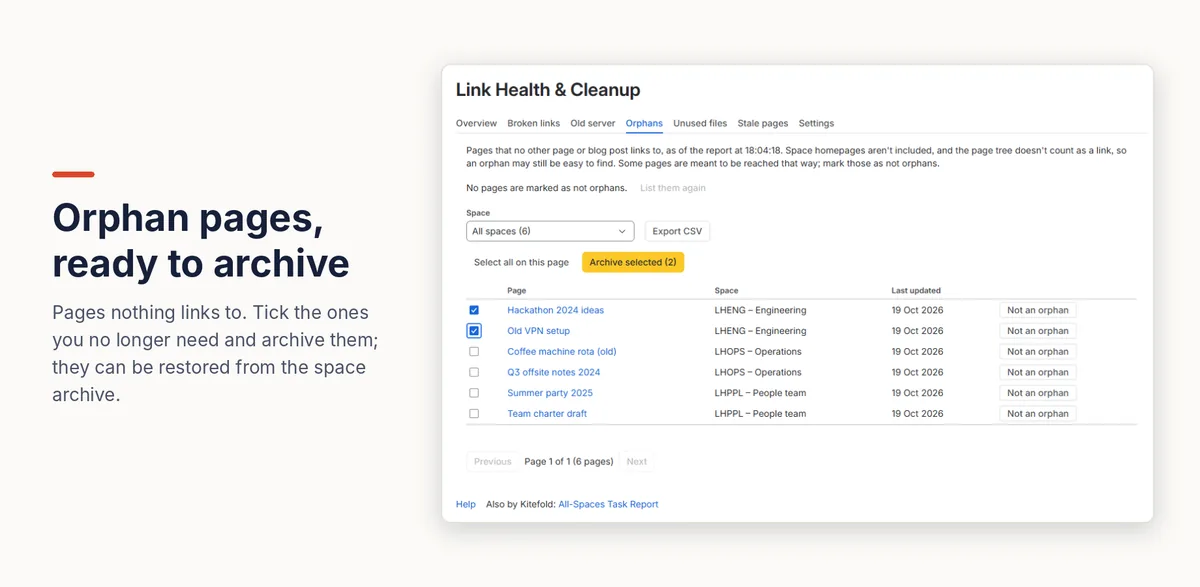
- A Confluence admin installs Link Health & Cleanup. It builds an index of every link on the site.
- Open Settings (the cog) → Link Health & Cleanup → Orphans. Space homepages aren't listed, and pages are shown with their space and when they were last updated.
- Tick the pages nobody needs (up to 50 at a time) and press Archive selected. After you confirm, they move to their space's archive, where anyone with permission can restore them. Mark pages that are meant to be reached another way as Not an orphan.
Archiving runs as you, so Confluence's permissions apply. Nothing is deleted. Spaces you don't want to clean up, such as templates or old archives, can be left out on the Settings tab.
Disclosure: Kitefold makes Link Health & Cleanup, so we're not neutral. The built-in options above are free and may be all you need.
Related guides
- How to see which pages link to a Confluence page
- How to find unused attachments in Confluence (and free up storage)
- How to find broken links in Confluence Cloud
- Confluence clean-up searches with CQL, and what CQL can’t find
Checked against Confluence Cloud in November 2026. Confluence changes often; if something here no longer matches what you see, email support@kitefold.app and we'll update it.